
How to Improve Product Adoption with Product Demo Videos
Published on
August 6, 2025
Estimated reading time:
12
minutes
The Adoption Struggle Is Real
Rolling out new software is never just a technical task—it’s a human one. Even the smartest platform can stall if the people it was built for hesitate to click ** Get Started**. Learning curves, packed calendars, and anxiety about “breaking something” hold users back.
That’s why the product demo video has become a valuable tool for corporate product teams. A clear, engaging clip shows exactly how the product works, removes doubt, and sparks a confident first login. In other words, a well-crafted demo makes users “get it” and, more importantly, use it.
Why User Adoption Matters
Adoption is more than a vanity metric. When employees or customers embrace a digital tool, three things happen:
- Revenue Grows. Activated users upgrade, renew, and buy add-ons.
- Retention Improves. Once a workflow turns into a daily habit, churn drops.
- ROI Becomes Visible. The budget line item turns into a measurable value.
Yet driving adoption is hard. Common roadblocks include:
- Complexity. Enterprise apps can have dozens of menus, and every product feature competes for attention.
- Resistance to Change. People cling to familiar spreadsheets or legacy systems.
- Fear of the Unknown. “What if I do something wrong?” feels risky when real data or dollars are on the line.
Traditional fixes like PDF guides, email blasts, or a single kickoff webinar rarely stick. They ask busy users to read or listen before they can see. Memory fades, frustration returns, and adoption stalls.
How a Product Demo Video Bridges the Gap
Picture two onboarding experiences. In the first, the user scans a written manual for instructions. In the second, they watch a 90-second clip that shows a real person logging in, navigating the dashboard, and exporting a report. Which path creates momentum? The video, every time.
A product demo video:
- Removes friction. The visual walk-through answers “How do I start?” in seconds.
- Builds confidence. Users witness success, then imitate it.
- Speeds time-to-value. They replicate the steps immediately, turning “I’m confused” into “I’m excited to try this.”
Because the brain processes images 6x-600x faster than words, demo video content translates features into actions faster than any written guide.
The Psychology of Adoption: Why Video Works
Seeing is believing
When prospective users see the product in action, they stop wondering if the software will meet their needs. Trust climbs because proof is on-screen.
Self-insertion
A viewer who watches a peer complete a task imagines, “That could be me.” The video lowers anxiety and unlocks permission to explore.
In short, video short-circuits uncertainty. That mental shift is the first step toward forming a lasting habit.
Tips for Creating Demo Content That Drives Adoption
Focus on benefits—outcomes over menus
Users care about results. Show how finishing a task saves time or reduces errors. Menus are supporting actors, not the star.
Keep it concise
Aim for a short video with two to three minutes per task. Break longer flows into a series so viewers can choose their own path.
Solve real pain points
Pick scenarios that your audience handles daily. Payroll managers need to close a pay period; marketers need to pull campaign analytics. Teach that first.
Highlight a handful of key features
Limit each chapter to a few actions so the learner never feels overwhelmed.
Layer instruction
Open with context. “Here’s the problem we’ll solve.”
Show the clicks. “Watch the steps.”
Close with reinforcement. A quick recap and on-screen checklist anchor the lesson.
Make it personal
Include voice-over, captions, and subtle branding cues to boost brand awareness and accessibility.
Guide the next step
End with a strong call to action, “Try it now” or “Import your data today”, plus a deep link that opens the exact screen inside the app.
Choose the right format
Some teams prefer filmed live action segments featuring subject-matter experts. Others lean on screen captures paired with motion graphics. Often, a blended approach works best.
Polish the experience
High-resolution capture, crisp audio, and professional graphics signal high quality. Viewers equate production value with software reliability.
Demo Video vs. Product Overview Video—Know the Difference
Purpose
- Product Overview: Sparks curiosity and explains why the product exists—ideal for generating initial interest.
Product Demo: Teaches the how so viewers can complete a task immediately, driving real adoption.
Audience
- Product Overview: Targets prospects in the early-awareness stage who need to understand the big picture.
- Product Demo: Serves new users, power users, and customer-success teams who need actionable guidance.
Length
- Product Overview: Typically runs 60–90 seconds—just enough to plant the idea.
- Product Demo: Runs two to five minutes per task, giving viewers the depth required to follow along.
Tone
- Product Overview: Inspirational and big-picture, highlighting vision and outcomes.
- Product Demo: Instructional and hands-on, focusing on concrete steps.
Content
- Product Overview: Covers vision, benefits, key use cases, and various product-plan options.
- Product Demo: Provides a click-by-click walk-through with real data, guiding users up a clear skill ladder.
Both formats belong in a comprehensive onboarding journey, but only the demo video moves the adoption needle from curiosity to competence.
Real-World Examples: From Awareness to Adoption
Dayforce: Complex HR, Simple Story

At Discover 2024, Dayforce partnered with Gorilla Creative to create a sleek, 90-second animated video that unveiled their latest product innovations during the Innovation Keynote. The challenge: develop a high-impact visual story before all product features were finalized, without relying on static UI or feature lists. Our solution blended crisp animation with an authentic on-screen presence from Meghan Sullivan, Dayforce’s VP of Design, whose warmth and credibility grounded the narrative. By aligning with an existing green screen shoot, we saved production costs and reinvested in dynamic motion design. The result was a modern, people-centered video that made complex updates feel clear, compelling, and future-forward.
Workday Peakon Employee Voice: Data to Action
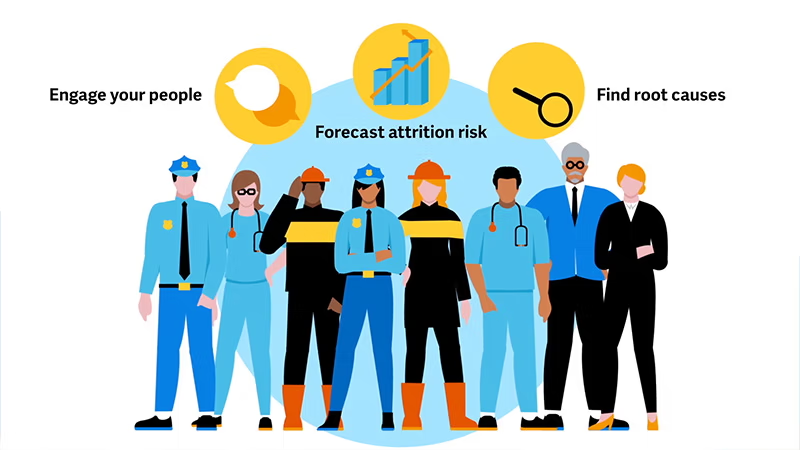
When Workday acquired Peakon in 2021, they needed a demo video—fast. The product was evolving, the UI was changing daily, and the timeline was under four weeks. Gorilla Creative stepped in to deliver two polished, effective demo videos using simple 2D illustrations, animated text, and enhanced screen recordings. We helped Workday weigh speed, cost, and production value to find the right approach for their goals. The result: clear, on-brand videos that supported product education and adoption during a time of major workplace change.
Decodable: Software Demo
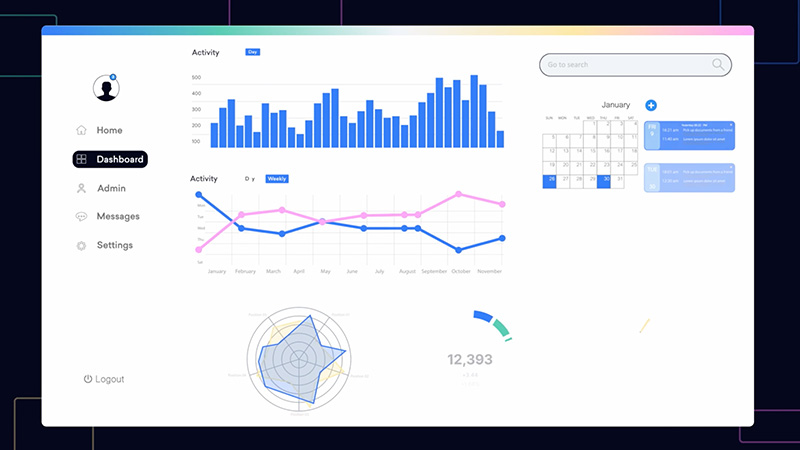
Gorilla Creative partnered with Decodable to produce a high-impact product video that clearly explains what the platform does and why it matters. Aimed at technical audiences, the video uses real UI screen captures, animated callouts, and a professional voiceover to showcase Decodable’s core functionality and unique value. We led the process from creative development through post-production, providing scripting feedback, animation, sound design, and collaborative review tools. The final video now serves as a key asset across Decodable’s marketing and sales channels.
The Gorilla Difference: Making Videos That Stick
Gorilla Creative takes the time to understand your needs and makes sure that every frame supports the goal:
- Discovery. We map user roles, tasks, and adoption KPIs.
- Story Architecture. Scripts zero in on the highest-friction moments in the journey.
- Production. Motion graphics, interactive product demo overlays, or filmed walk-throughs—whatever best educates your audience.
- Iteration. We can provide A/B-test thumbnails, captions, and formats for specific distribution channels, such as social media, to maximize reach.
- Enablement. Cut-downs for webinars, onboarding microsites, and in-app help deliver value long after the product launch.
The result is a library of assets that serve customer success, sales engineering, and training teams alike, proof that an investment in video turns a good product into a great experience.
Step-by-Step Blueprint to Build Your First Demo
- Clarify Objectives. Before you create a product demo, agree on the single moment that signals success: exporting a report, configuring an integration, or completing the first payroll.
- Gather Raw Inputs. Interview product managers, support leads, and power users. Ask where tickets spike and which terms resonate with beginners.
- Write a Plain-Language Script. Limit jargon, define acronyms, and start with the problem before revealing the solution.
- Visualize Every Beat. Storyboards map UI screens, cursor paths, and zoom-ins for emphasis.
- Record the Raw Material. Software flows need a crystal-clear capture; mobile flows may require other custom shots.
- Assemble and Polish. Motion graphics smooth transitions, while text overlays reinforce spoken instructions.
- Quality-Control. Test with new users, note where they pause or rewind, then adjust pacing or wording.
- Localize and Caption. Subtitles broaden reach, improve accessibility, and raise completion rates overseas.
Distribution: Put the Demo Where Adoption Happens
- In-App Onboarding. Trigger the clip the first time a user lands on the relevant page.
- Email Drip Campaigns. Pair the video with a short success story and a single CTA link back to the app.
- Learning Management Systems. Break the demo into micro-lessons that employees can track for certification.
- Help-Desk Articles. Embed the video at the top of tutorials so readers can watch before scanning screenshots.
- Sales Enablement Portals. Equip reps with a concise link they can share during calls to showcase depth quickly.
- Industry community feeds. Short teaser clips drive traffic back to gated resources or trials.
Measure, Learn, Refine
When your demo goes live, five performance signals tell you whether it’s moving the adoption needle:
- Play Rate – The percentage of people who click “play” after seeing the thumbnail and title. If this falls below 60 percent, your first impression isn’t landing—experiment with a tighter headline or a more eye-catching still frame.
- Completion Rate – How many viewers stick around to the end of the video. A 50 percent finish rate (or higher) on videos under three minutes suggests the narrative is clear and the pacing works. Dip below that and consider trimming fluff, adding chapter markers, or tightening VO.
- Feature-Usage Delta – Compare how often a highlighted product feature is used in the 30 days before and after someone watches the video. A healthy uptick confirms that viewers aren’t just entertained; they’re translating what they saw into action.
- Support-Ticket Volume – Track tickets tied to the workflow your demo covers. A steady downward slide means the video is deflecting “How do I…?” questions and relieving your support team’s load.
- Time-to-First-Value (TTFV) – Measure the hours or days it takes a new user to complete a meaningful task after sign-up. Because TTFV correlates directly with renewal rates, faster is always better; a shrinking number here signals true ROI.
Feed insights back into scripts, thumbnails, and even product UI tweaks. Over time, each demo becomes a living asset that evolves with the software.
Think of these metrics as a relay team that moves a new user from first click to lifelong advocate. A high play rate confirms your thumbnail and title fired the starting gun, while a solid completion rate proves the story held their attention long enough to show how the product works. When the feature-usage delta climbs, you know viewers copied what they saw on-screen since the heat-map data from the original screen record often pinpoints which product feature sealed the deal. Fewer tickets and a faster time-to-first-value translate directly into higher renewals and fresh revenue, so monitor the full set together rather than in isolation.
Frequently Asked Questions
What’s the ideal length for a product demo video?
Keep each task-focused clip to about two or three minutes. Longer tutorials can be split into a playlist so viewers jump straight to the chapter they need, respecting tight schedules.
How do we measure adoption after launching the video?
Compare feature-usage rates 30 days before and after the video rolls out, track completion rates in your LMS or in-app player, and monitor support-ticket volume for the topic covered. A unique URL parameter on the call to action ties engagement to real log-ins.
Can we reuse the demo during a product launch event?
Absolutely. Trim a 20-second highlight reel for the keynote, then guide attendees to the full demo for hands-on follow-up. One asset can fuel multiple touchpoints throughout your marketing strategy.
How do we create demos for different pricing tiers without blowing the budget?
Film a “master” walk-through that showcases shared key features, then add inexpensive motion graphics callouts for premium functions. Swapping overlays lets you address multiple product plans without additional shoots.
How do we localize for global teams?
Keep on-screen text minimal and export transcripts for rapid translation. Add foreign-language captions and, when budget permits, localized voice-overs. That avoids rebuilding graphics for every market.
Are captions really necessary?
Yes. Captions improve accessibility, boost SEO, and let busy professionals watch on mute. They’re also indexed by internal site search, helping users discover the right clip faster.
Beyond Adoption: Strategic Upsides of Demo Content
- Sales Acceleration. Reps share demos with late-stage prospects to overcome objections.
- Support Deflection. A link in chat resolves issues faster than a 20-line response.
- SEO Magnet. Public help-center demos rank for “how-to” searches and pull organic traffic.
- Investor Relations. A polished clip in quarterly updates showcases user-centric design.
- Community Building. Share expert-level workflows to inspire power users and crowd-source innovation.
Common Pitfalls and How to Avoid Them
- Kitchen-Sink Syndrome. Cramming every feature confuses beginners. Stick to one outcome per clip.
- Over-Producing. Heavy visual effects can distract; let the software be the hero.
- No Context. Starting at a random screen without explaining why alienates users.
- Out-of-Date UI. Even small mismatches erode trust; review demos alongside release notes.
- Missing CTA. Users finish the clip but don’t know what’s next, so always close with a next step.
Future-Proofing Your Demo Strategy
Embrace Interactivity
Clickable hotspots and quizzes turn passive watchers into active learners. An interactive walkthrough lets viewers branch into relevant flows, making the experience feel like using the app itself.
Leverage Data
Heat maps and drop-off graphs reveal friction points. Use those insights to guide both content tweaks and product-roadmap priorities.
Building the Business Case: Calculating ROI
A CFO may ask, “Why invest in video when we have written docs?” Consider a SaaS platform with 5,000 new seats per quarter:
Say the average onboarding ticket costs $35 in support time, and historical data shows 1.8 tickets per new user in the first 60 days.
That’s $315,000 in reactive support each quarter. After publishing a targeted demo series, ticket volume drops to 0.6 per user, saving $210,000 in three months. If the project costs $45,000, payback arrives in less than four weeks. Add faster time-to-value, which drives earlier renewals, and the return multiplies.
Present numbers like these to finance, and approval becomes a formality.
Ready to See It in Action?
Users don’t adopt software because it wins awards; they adopt it when it makes their job easier today. A clear, focused product demo video bridges the gap between promise and practice. By anchoring content in real tasks, polishing production, and iterating on performance data, you create an evergreen asset that scales with every release.
Software adoption doesn’t have to be a guessing game. Gorilla Creative scripts, shoots, and optimizes demo content that turns hesitant clicks into loyal champions. Ready to boost your software adoption? Let’s talk.

Author:
Eric Stracke
Eric is the Co-Founder and Creative Director at Gorilla Creative. He earned a B.S. in Digital Film and Video Production from the Art Institute of California, San Francisco. He finds great satisfaction in the creative process of producing a video from concept to completion.


Gorilla Creative is a full service corporate video production company located in San Francisco, California.
hello@gorillacreative.com | (415) 907-4427 | 535 Mission St, Floor 14, Suite 1681, San Francisco, CA 94105
© 2026 Gorilla Creative. All rights reserved. Privacy Policy