
LinkedIn Video Specs & Sizes Guide 2025
Published on
November 25, 2025
Estimated reading time:
9
minutes
By Lorianna Sprague, Founder & CEO of UPFRONT MKTG LLC, for Gorilla Creative
When I began my marketing career, the complexity we managed felt huge. But looking back, it was nothing compared to today. Now, digital content teams are juggling creative assets for a growing list of social media platforms, each with its own ever-evolving requirements. Aspect ratios, max file sizes, autoplay rules, captioning standards… if you’re producing video for multiple channels, you know the chaos.
LinkedIn used to feel simple. It was a place for polished corporate video and maybe the occasional product clip. Fast-forward to 2025: it has become one of the most dynamic and demanding environments for B2B video marketing. Video dominates the feed, attention spans are shorter than ever, and every pixel of your upload impacts engagement.
Meanwhile, design and video production teams are expected to know which assets need to be delivered in 4:5 vs. 16:9, whether captions must be burned in or uploaded separately, what the max file size is for Sponsored placements, how long videos should be for awareness vs. conversion…and don’t forget thumbnails, link previews, and safe zones.
It’s too much to memorize.
Too much to double-check every single time.
And too important to risk getting wrong.
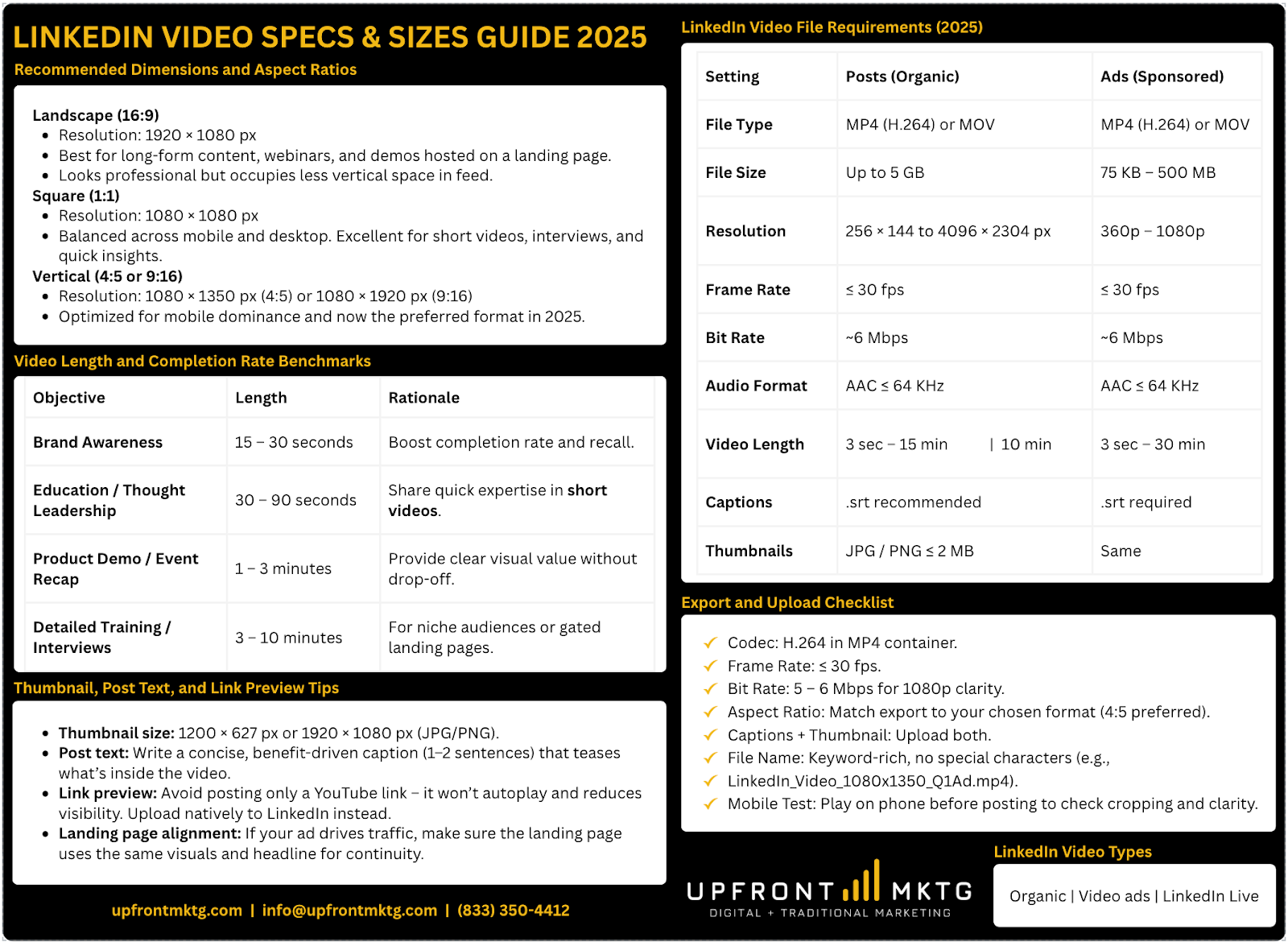
That’s why I created this guide and the downloadable LinkedIn Video Cheat Sheet - a clean, organized quick reference built to reduce production friction and eliminate guesswork. My goal is to give creative and marketing teams confidence that their videos will be formatted correctly, look great in the feed, and deliver the best possible results - without digging through documentation every time they export a file.
Why LinkedIn Video Formatting Matters
LinkedIn has become one of the most important social media platforms for professional networking, thought leadership, and B2B brand visibility. Marketers have embraced video content as the preferred way to reach decision-makers and show expertise in real time - but even well-produced videos can fail to perform if they don’t meet the correct LinkedIn video specs.
Uploading the wrong LinkedIn video size, aspect ratio, or file format can cause poor display, cropping, or compression. Those technical details directly affect watch time, completion rate, and how your brand looks in the LinkedIn feed.
This guide breaks down everything marketing teams and video production professionals need to know about LinkedIn video size, dimensions, formats, and ratios for both posts and ads—plus practical tips to optimize your videos for reach, clarity, and conversion in 2025.
Understanding LinkedIn Video Types
Before planning your next campaign, identify which type of content you’re posting:
- Organic LinkedIn posts – native video content uploaded directly to your company page or personal profile. Ideal for thought leadership, updates, and product demos.
- LinkedIn video ads – sponsored placements launched through Campaign Manager with unique LinkedIn video ad specs. Great for lead generation and awareness campaigns.
- LinkedIn Live – real-time streaming for events, interviews, and webinars (requires separate encoder setup).
Knowing the right format for each type ensures your video production and export settings align with LinkedIn’s technical requirements.
LinkedIn Video File Requirements (2025)
Here are the up-to-date LinkedIn video specs for both posts and ads:
Recommended Dimensions and Aspect Ratios
Aspect ratio refers to the proportion between your video’s width and height. The right choice determines how your LinkedIn videos display in the feed.
Landscape (16:9)
- Resolution: 1920 × 1080 px
- Best for long-form content, webinars, and demos hosted on a landing page.
- Looks professional but occupies less vertical space in feed.
Square (1:1)
- Resolution: 1080 × 1080 px
- Balanced across mobile and desktop. Excellent for short videos, interviews, and quick insights.
Vertical (4:5 or 9:16)
- Resolution: 1080 × 1350 px (4:5) or 1080 × 1920 px (9:16)
- Optimized for mobile dominance and now the preferred format in 2025.
- This is often referred to as LinkedIn vertical video, perfect for mobile-first audiences.
Keep all text, logos, and captions inside the safe zone – the central 1080 × 1080 px area – to prevent cropping on smaller screens. When testing the LinkedIn video post size, preview your uploads on both desktop and mobile before publishing.
Orientation and Feed Display
LinkedIn’s feed automatically adjusts layout based on your video’s aspect ratio. Vertical and square formats fill more of the screen, making them easier to notice while scrolling. If your target audience primarily uses mobile, these formats consistently outperform landscape.
For brand storytelling or product demo clips, keep branding visible but minimal in the first few seconds. A clean thumbnail and captioned text help even when autoplay sound is muted.
Video Length and Completion Rate Benchmarks
The sweet spot for video length depends on your campaign goal:
Shorter videos (under 60 seconds) typically drive higher completion rates and stronger engagement, especially in sponsored placements.
Audio, Captions, and Accessibility
Most LinkedIn users watch videos with the sound off, so captions are crucial. Use clean, high-contrast text – white with a semi-transparent black background – and include an .srt file when you post your video.
Keep on-screen text large and readable, especially for vertical videos. Normalize audio between –6 and –3 LUFS to ensure consistent volume across all social media video platforms. These small steps make your brand look more professional and improve accessibility.
Thumbnail, Post Text, and Link Preview Tips
Your thumbnail and surrounding copy influence clicks almost as much as the video itself.
Thumbnail size: 1200 × 627 px or 1920 × 1080 px (JPG/PNG).
Post text: Write a concise, benefit-driven caption (1–2 sentences) that teases what’s inside the video.
Link preview: Avoid posting only a YouTube link – it won’t autoplay and reduces visibility. Upload natively to LinkedIn instead.
Landing page alignment: If your ad drives traffic, make sure the landing page uses the same visuals and headline for continuity.
Export and Upload Checklist
Before publishing, confirm that each file meets these LinkedIn video ads specs:
- Codec: H.264 in MP4 container.
- Frame Rate: ≤ 30 fps.
- Bit Rate: 5 – 6 Mbps for 1080p clarity.
- Aspect Ratio: Match export to your chosen format (4:5 preferred).
- Captions + Thumbnail: Upload both.
- File Name: Keyword-rich, no special characters (e.g., LinkedIn_Video_1080x1350_Q1Ad.mp4).
- Mobile Test: Play on phone before posting to check cropping and clarity.
Common Upload Issues and Fixes
- Blurry video: Re-export at 1080p with higher bit rate.
- Cropping or black borders: Wrong aspect ratio – use the official LinkedIn video dimensions chart.
- Audio missing: Ensure AAC ≤ 64 KHz.
- No autoplay: You used a YouTube link instead of native upload.
- File rejected: Exceeded size limit or unsupported codec.
Mobile Optimization and Vertical Performance
Over 80 percent of LinkedIn videos are viewed on mobile. To improve visibility:
- Prioritize 4:5 vertical or 1:1 square ratios.
- Design motion graphics with large, centered text.
- Keep captions under two lines.
- Maintain file sizes under 250 MB.
- Preview your LinkedIn vertical video in the mobile app before publishing.
These adjustments can double engagement rates and help your ad campaign look native in mobile feeds.
Cross-Platform and Video Production Alignment
Your video production workflow should create adaptable content for all major social media platforms.
Planning for multi-platform delivery lets teams create videos once and resize without re-shooting, saving editing time and keeping branding consistent.
Quick Reference: 2025 LinkedIn Video Specs
How to Optimize Your Videos for Performance
Even the right LinkedIn video size won’t guarantee engagement without optimization.
- Hook viewers in the first 3 seconds.
- Use clear CTAs in short videos.
- Keep tone authentic and professional.
- Analyze completion rate and drop-off points.
- Maintain posting consistency for algorithmic reach.
When your creative strategy matches these technical details, your LinkedIn video ads specs and results work together for maximum impact.
Adding Links, Visuals, and Value
Make your article more authoritative and reader-friendly by adding internal links to case studies or services, citing reliable sources like LinkedIn’s documentation, and embedding visuals such as aspect ratio charts and safe-zone guides.
Conclusion
LinkedIn continues to be the leading platform for professional video marketing. Understanding the correct LinkedIn video dimensions, formats, and ratios ensures your content looks polished and reaches the right target audience.From post text to landing page integration, every detail affects connection and conversion. By following this LinkedIn Video Specs & Sizes Guide 2025, your team can confidently produce optimized, platform-ready videos that strengthen your brand and results.

Author:
Lorianna Sprague
Lorianna Sprague is the Founder & CEO of UPFRONT MKTG, a full-service marketing and web development agency based in Lancaster, Pennsylvania. With over a decade of experience in SEO, YouTube SEO, and content strategy, Lorianna helps brands translate analytics into actionable marketing systems that drive measurable growth - from YouTube marketing and digital storytelling to landing page optimization and product page performance.


Gorilla Creative is a full service corporate video production company located in San Francisco, California.
hello@gorillacreative.com | (415) 907-4427 | 535 Mission St, Floor 14, Suite 1681, San Francisco, CA 94105
© 2026 Gorilla Creative. All rights reserved. Privacy Policy